 Shopify
Tag every update by type and area
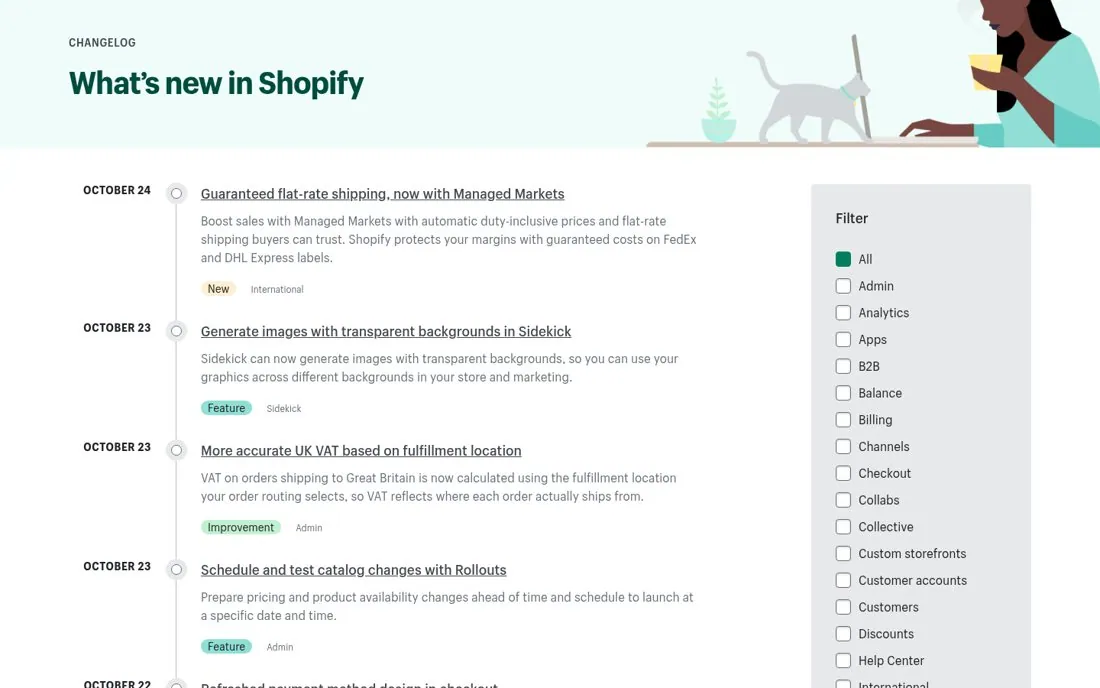
Shopify's changelog headline is What's new in Shopify. Each entry sits on a dated timeline with a one line summary and two tags, a type like New, Feature or Improvement and an area like International, Sidekick, Admin or Checkout. A Filter sidebar on the right lets merchants narrow the list to the parts of Shopify they use.
Updated · By Blake Emal
Two tags per entry let a merchant scan for what touches their store, so a busy changelog stays useful instead of noisy. To copy it, tag each entry with a type and a product area. Then add a filter sidebar for the areas.
- Tag each entry with a type and a product area
- Add a filter sidebar for the areas
- Keep each summary to one or two lines
Live page captured Oct 24, 2026 · Shopify