Today’s Marketing
 Cursor
Show the step between the preview and the published app
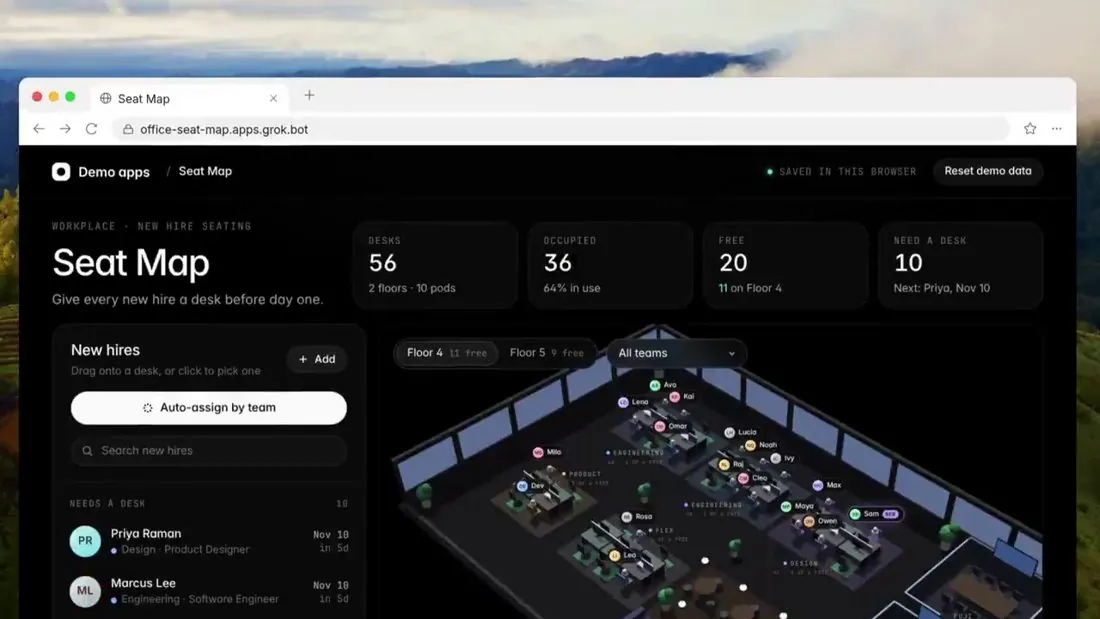
Cursor posted a seat-map app demonstration on Nov 5, 2026. It moves from a seat-map request to a split view with a 3D office preview, shows Publish and domain configuration, then displays the resulting app in a browser.
Updated · By Blake Emal
The publishing controls and browser result show where the work goes after the preview, answering a practical question buyers would otherwise have to imagine. To copy it, choose a specific team task and keep the same example through the preview, publishing controls and resulting app..
- Choose a specific team task and keep the same example through the preview, publishing controls and resulting app.
- Show the handoff out of the development environment, including the destination URL and resulting browser view, without implying the edited video proves build time or reliability.
Posted Nov 5, 2026 · Cursor
Bring Blake your homepage or launch plan and leave with the new version written. Book a call
Product Launch ExamplesAI Feature Launch Examples That Took OffHow to announce an AI model or feature